
TL;DR
When you use claude.ai or Claude Code, you're using an agent — software that wraps a raw LLM with a conversation loop, memory, tools, and a system prompt. The API gives you only the raw model. This lab is about building the agent layer yourself, which is why the same model can feel so different depending on what's wrapped around it.
The idea
A raw LLM does one thing: text in, text out, with no memory of the last call (Lesson 1). That's powerful but bare. The polished experience you get from claude.ai or Claude Code isn't the raw model — it's an agent: a program that surrounds the model with everything it needs to feel helpful and stay on task.
The agent layer typically adds:
- A conversation loop — it keeps calling the model and feeding results back.
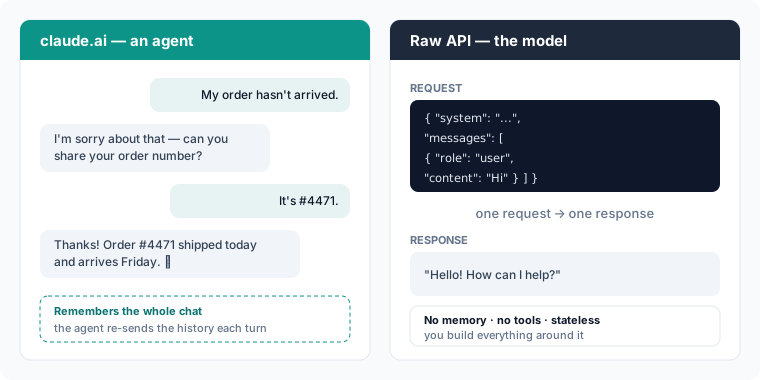
- Memory — it stores the conversation history and re-sends it each turn.
- Tools — it lets the model search, run code, call APIs, read files.
- A system prompt — a carefully written instruction set you never see.
claude.ai and Claude Code are agents. The API hands you only the inner box; you build the layer around it.
Analogy
The raw LLM is an engine. claude.ai is the whole car built around that engine — steering, dashboard, fuel system, safety features. The API ships you the engine on a pallet. Same horsepower; you're responsible for building the car.
Example: the same question, two ways
Ask the same question two ways and you'll notice the difference:
- Through claude.ai (an agent): the answer is polished, remembers your last message, can search the web or run code, and follows house rules you never wrote. That refinement comes from the agent wrapped around the model.
- Through the API (the raw model): you send messages, you get one completion back, and that's it. No memory, no tools, no hidden system prompt — unless you build them. The response can feel more "raw" precisely because nothing is steering it yet.
Claude Code is another agent on top of the same kind of model. It can read your whole codebase, run shell commands, edit files, and stay coherent across a long task — not because the model is different, but because the agent around it feeds the model the right context and tools at each step.
| Raw LLM (the API) | Agent (claude.ai, Claude Code) | |
|---|---|---|
| What you get | One response to one request | A full assistant experience |
| Memory of the chat | None — stateless | Yes — history is re-sent each turn |
| Tools (search, code, files) | None by default | Built in |
| System prompt | You write it (or none) | Crafted for you, hidden |
| Who builds the loop | You do | Already built |
That last column is the whole point of this lab: you are going to build the agent layer, piece by piece, on top of a raw model.
Try it yourself
The demo below is about as close to a raw model call as it gets: one system message, one user message, one response — no memory, no tools. This is the bare material an agent is built from. Notice there's no "conversation" here, just a single request and reply.
Common mistake
People say "the LLM remembered what I said." It didn't — the agent did. The model is stateless; the app stores your history and re-sends it on the next call. You'll see exactly how that works (and what it costs) in the next two lessons.
Key takeaways
Key takeaways
- claude.ai and Claude Code are agents built on top of a raw LLM.
- The API gives you the raw model only — no memory, tools, or hidden prompt.
- An agent = LLM + conversation loop + memory + tools + system prompt.
- This lab is about building that agent layer yourself.
Go deeper: the simplest possible agent loop
Strip an agent down to its essence and it's a loop:
- Add the user's new message to the running history.
- Send the whole history (plus the system prompt and available tools) to the model.
- If the model asks to use a tool, run it and add the result to the history.
- Repeat step 2 until the model produces a final answer.
- Show that answer and wait for the next user message.
That's it. Everything fancy — multi-step reasoning, web search, code execution — is this loop with more tools and better prompts. By the end of this lab you'll have built every part of it.